









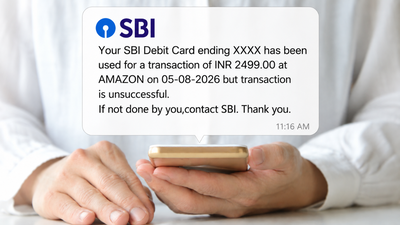
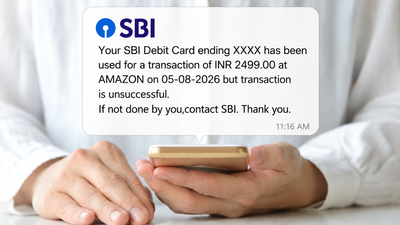
At first glance, there was almost nothing to distinguish the two SMS messages. Both appeared to come from SBI. Both carried the same sender-style header. Both referred to a failed debit-card transaction and looked like the kind of alert a bank customer would normally receive.But one was genuine. The other was a scam. The difference was so small that most people could easily miss it: one letter in the sender name was in lowercase.Finance professor and SEBI-registered investment adviser Prof Vinny Arora highlighted the example in a video posted on his Instagram profile @moneyvsme, showing how fraudsters can make a fake bank SMS look almost indistinguishable from a genuine one.His larger point is worth remembering: never trust a bank SMS simply because the sender name looks familiar. Check the sender header before clicking anything.
The SBI SMS looked completely real
In the video, Arora shows two messages that appear to be SBI debit-card alerts. The messages say a transaction of Rs 2,499 at Amazon on August 5, 2026, was unsuccessful and ask the customer to contact SBI if the transaction was not made by them.One of the messages also contains a “Click Here to block your card” prompt. The sender displayed above the message appears almost identical in both cases. That is what makes the example particularly deceptive.Arora then points out the detail that can easily escape notice: one of the letters in the sender header is lowercase.It may look like a harmless difference in typography. It isn’t.TRAI’s system treats SMS headers as case-sensitive, meaning a change in capitalisation can make a seemingly familiar header a different header altogether. In the demonstration, Arora checks the suspicious-looking header and receives a response indicating that the header has not been registered.That is the clue that can help a customer stop before clicking. So how can you check whether an SMS is genuine? Arora demonstrates three checks that consumers can use.

Fraudsters can use look-alike sender names to make scam SMSes appear genuine.
1. Use 1909 to check the SMS header
The first method shown in the video involves TRAI’s 1909 service.Instead of clicking anything in the suspicious message, copy the relevant sender header and use the 1909 service to check it. In the video, the query is sent in the format “DETAILS OF [header]”, after which a response indicates whether the header is registered.TRAI itself says consumers can use 1909 for complaints or reports about unsolicited commercial communication. Its published material also provides the “DETAILS OF <Header>” format for fetching information about a particular header.One important point: 1909 is not a substitute for independently verifying every banking message. It is primarily a telecom complaint/reporting channel, while TRAI’s dedicated Header Information Portal is designed to help consumers find out who sent a commercial or government-awareness SMS.
2. Check the sender on TRAI’s Header Information Portal
The second method is perhaps the more straightforward one: use TRAI’s Header Information Portal.TRAI says the portal allows consumers to find the entity behind commercial and government-awareness communications. It can also help identify whether a look-alike header has been registered by another entity.[TRAI Header Information Portal] (https://smsheader.trai.gov.in)This is particularly useful when a sender name looks familiar but something about it feels slightly off.For instance, if an SMS claims to be from your bank but the header entered into the portal does not correspond to that bank or appears unregistered, that should immediately raise a red flag. TRAI also maintains a compiled list of SMS headers used for commercial communication.
3. Look at the sender name character by character
The third check is the simplest- and perhaps the easiest to overlook. Look at the sender name again. Carefully.In Arora’s example, the giveaway is a lowercase letter in a sender header that otherwise looks like the genuine SBI sender. This is the kind of trick that works because people tend to read sender names as words rather than examine every character. A fake sender does not necessarily need to use an obviously different name.A subtle change in capitalisation or a look-alike character may be enough to make the message appear legitimate. And because SMS apps can group messages from similar-looking senders in ways that feel familiar, users may lower their guard even further.
Don’t click first and verify later
The safest habit is to reverse the order. Verify first. Click later- if at all.SBI has repeatedly warned customers about fraudulent messages containing links that lead to fake pages designed to collect banking credentials or other sensitive information. The bank advises customers not to click links received through SMS or email for financial or banking activities and never to share confidential information such as OTPs, passwords, PINs or other credentials.That matters because a fraudulent SMS may create a sense of urgency. A message saying that a transaction has taken place, a card needs to be blocked or an account requires immediate action can make a customer react instinctively.That is exactly when people are most likely to click without checking.Instead, open the bank’s official mobile app yourself or type the bank’s official website into the browser. If you are concerned about a transaction, contact the bank through an official customer-care channel rather than using a number or link provided in the suspicious SMS.
Why the sender header matters
Under TRAI’s regulatory framework, commercial communication is supposed to be sent using registered alphanumeric headers. TRAI defines a header as an alphanumeric string of up to 11 characters assigned to an individual, business or legal entity for sending commercial communications. That makes the header an important piece of information- but it should not be treated as the only security check.A registered-looking sender does not automatically make the contents of a message safe. A message can still contain a malicious link or attempt to trick you into revealing information. The header check is therefore best viewed as one layer of verification, not a guarantee that every word in the SMS is genuine.
The bigger lesson: don’t trust familiarity
The most unsettling part of Arora’s example is not that the scam SMS looked convincing. It is how little effort it took to make it convincing. There was no glaring spelling mistake. No obviously strange sender name. No cartoonish scam language.Just a tiny difference that could easily be missed.That is why the next time an SMS arrives claiming to be from your bank, take a few seconds before acting. Check the sender header. Use TRAI’s tools if you are unsure. Look closely at capital and lowercase letters. And most importantly, don’t click a link simply because the message appears to have come from a familiar bank.When money is involved, a few seconds of checking can be worth far more than a few seconds saved by clicking.